


简介
很早以前就学过C语言了,那个时候Python刚热门起来也学了下来,毕竟轮子多嘛方便,后面不怎么用C了慢慢的就忘记了,现在整理下复习笔记,方便自己查阅资料。
C语言环境安装
Mingw下载地址: https://sourceforge.net/projects/mingw/files/Installer/mingw-get-setup.exe
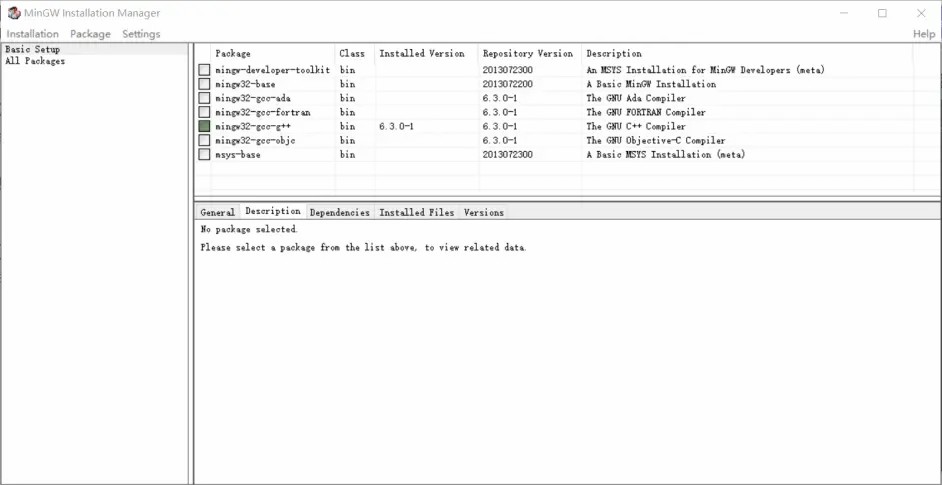
1.下载完后运行Mingw,到这个界面后点击左上角的 Basic Setup,在右边面板寻找 mingw32-gcc-g++,鼠标右击并点击 Mark for Installation,之后再点击左上角的 Installation > Apply Changes。
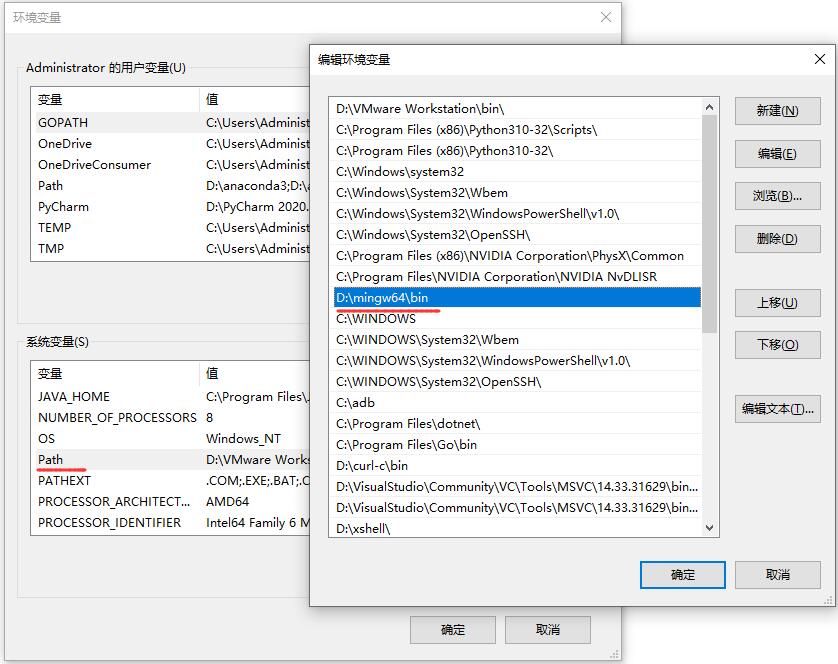
2.下载完后关掉所有界面,右击"此电脑" > 属性 > 高级系统设置 > 环境变量 > 在下面的系统变量中双击Path,如果之前没有改过安装路径,就添加 C:\MinGW\bin,按情况来添加。
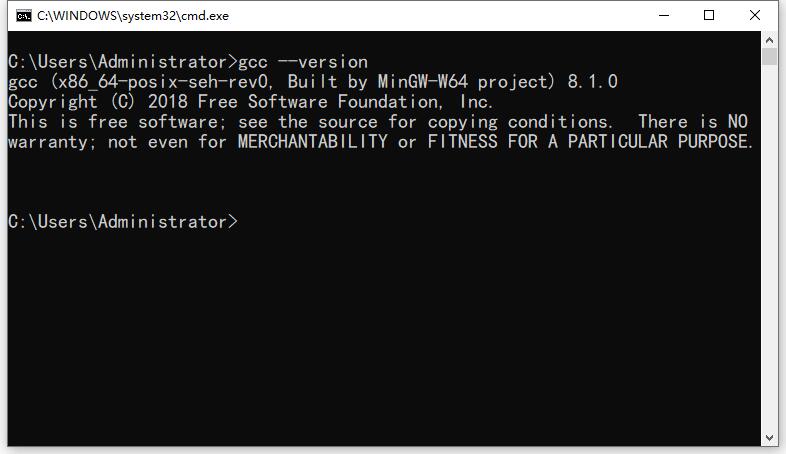
gcc --version3.添加好后输入 gcc --version 回车,能看见正常显示那就没问题了,只要配置了gcc的环境变量,那么vscode也可以运行。
VSCode运行C代码

1.到vscode应用商店安装,Code Runner 有了这个插件就很方便了,直接在vscode里运行代码。
gcc编译器运行C程序
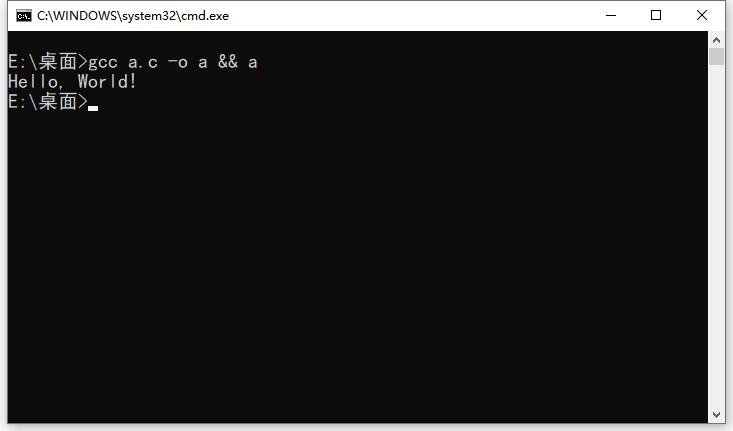
gcc a.c -o a && a   // C
g++ a.cpp -o a && a // C++
1.通过终端输入以上gcc命令,也是可以执行成功的。
C语言中的关键字
1.在C语言中,有32个关键字,它们具有预定义的含义,不能用作变量名,这些词也被称为 "保留词",最好避免将这些关键字用作变量名。
if,else,switch,case,default – 用于决策控制编程结构。
break – 用于任何循环或者switch-case。
int,float,char,double,long – 这些是数据类型,在变量声明期间使用。
for,while – C 中的循环结构类型。
void – 其中一种返回类型。
goto – 用于重定向执行流程。
auto,signed,const,extern,register,unsigned – 定义一个变量。
return – 该关键字用于返回值。
continue – 它通常与for,while和do-while循环一起使用,当编译器遇到此语句时,它执行循环的下一次迭代,跳过当前迭代的其余语句。
enum – 常量集。
sizeof – 用于了解尺寸。
struct, typedef – 结构中使用的这两个关键字(单个记录中的数据类型分组)。
union – 它是一组变量,它们共享相同的内存位置和内存存储。
volatile
编写第一个C程序
先来编写一个经典的开场,那就是你好世界啦,C语言是强类编译型语言,文件后缀是以.c结尾,c++是以.cpp结尾。

好了先创建一个 a.c 文件,将以下代码写入 a.c 文件里,然后再运行。
#include <stdio.h>         // 预处理器指令,告诉C编译器在实际编译之前要包含 stdio.h 文件

int main() {               // main主函数,程序从这里开始执行
  printf("Hello, World!"); // 输出函数 会在终端上显示内容
  return 0;                // 终止 main() 函数,并返回值 0
}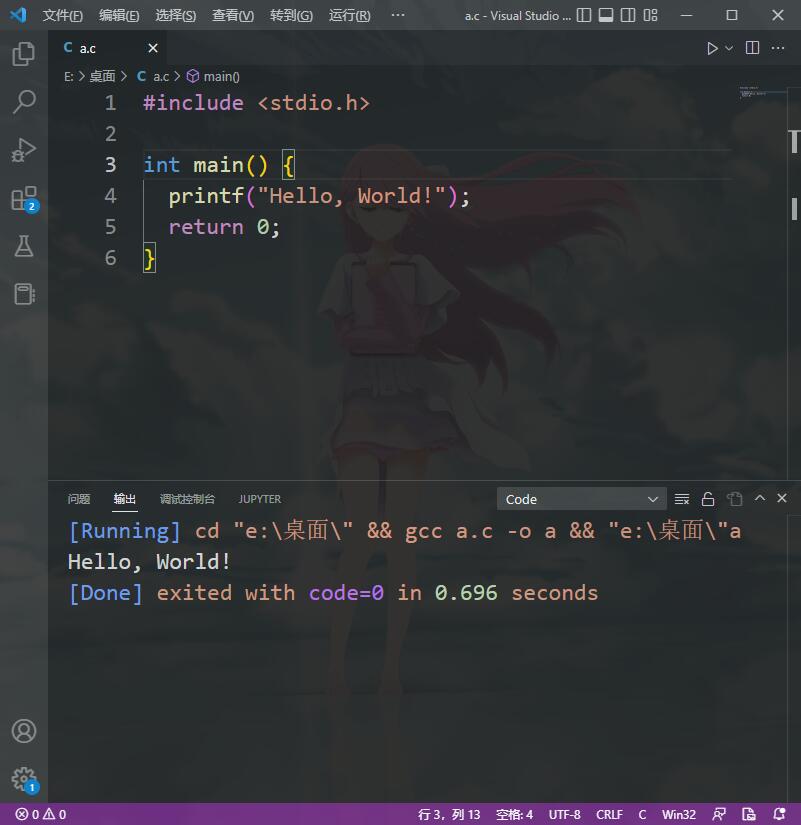
输出结果:Hello, World!代码注释
1.在日常的开发中,代码只会越写越多,而且不止是你一人在写,在团队中要想别人看的懂你的代码,就要用到注释了。
// 单行注释

/*
  多行注释
*/
2.内容写在注释里,编译器会忽略掉注释里的内容,这样就会方便我们在做开发的时候阅读代码。
if-else语句
if else语句的语法:
如果条件返回true,则执行if正文内的语句,并跳过else正文内的语句。
如果条件返回false,则跳过if正文中的语句,并执行else中的语句。
if(condition) {
   // Statements inside body of if
}
else {
   //Statements inside body of else
}
#include <stdio.h>
int main() {
int par = 1;
if (par == 1) { // 判断变量par 是否为真
printf("up"); // 成立就执行对的
}else{
printf("down"); // 否则就不成立
}
return 0;
}输出:upfor循环
C语言中最常用的循环。
步骤 1:首次初始化发生,计数器变量初始化。
步骤 2:在第二步中检查条件,其中计数器变量由给定条件测试,如果条件返回true则执行for循环体内的 C 语句,如果条件返回false,则for循环终止,控制流退出循环。
步骤 3:成功执行循环体内语句后,计数器变量会递增或递减,具体取决于操作(++或--)。
for (initialization; condition test; increment or decrement)
{
       //Statements to be executed repeatedly
}
#include <stdio.h>
int main()
{
int i;
for (i=1; i<=3; i++)
{
printf("%d\n", i);
}
return 0;
}输出:
1
2
3C语言中的各种形式的for循环,我在以下所有例子中使用变量num作为计数器。
1.这里使用num = num + 1而不是num ++。
for (num=10; num<20; num=num+1)2.初始化部分可以从循环中跳过,如下所示,计数器变量在循环之前声明。
int num=10;
for (;num<20;num++)
注意:即使我们可以跳过初始化部分但是分号(;)必须保留,否则你将得到编译错误。
3.与初始化一样,您也可以跳过增量部分,如下所示。
在这种情况下,分号(;)必须在条件逻辑之后。在这种情况下,增量或减量部分在循环内完成。
for (num=10; num<20; )
{
      //Statements
      num++;
}
4.这也是可能的,计数器变量在循环之前初始化并在循环内递增。
int num=10;
for (;num<20;)
{
      //Statements
      num++;
}
5.如上所述,计数器变量也可以递减。在下面的示例中,每次循环运行时变量都会递减,直到条件num > 10返回false。
for(num=20; num>10; num--)6.C语言中的嵌套for循环
循环嵌套也是可能的。让我们举个例子来理解这个:
#include <stdio.h>

int main()
{
   for (int i=0; i<2; i++)
   {
    for (int j=0; j<4; j++)
    {
       printf("%d, %d\n",i ,j);
    }
   }
   return 0;
}
输出:
0, 0
0, 1
0, 2
0, 3
1, 0
1, 1
1, 2
1, 37.在上面的例子中,我们在另一个for循环中有一个for循环,这称为循环嵌套。
我们使用嵌套for循环的示例之一是二维数组。
在 C 中循环内部进行多次初始化
我们可以在for循环中进行多次初始化,如下所示。
for (i=1,j=1;i<10 && j<10; i++, j++)上面的循环和简单的for循环有什么区别?
它正在初始化两个变量。
注意:两者都用逗号(,)分隔。
它有使用 与(&&)逻辑运算符连接在一起的两个测试条件。
注意:您不能使用以逗号分隔的多个测试条件,您必须使用逻辑运算符,例如&&或||连接条件。
增量部分有两个变量。注意:应以逗号分隔。
8.具有多个测试条件的for循环的示例
#include <stdio.h>

int main()
{
   int i,j;
   for (i=1,j=1 ; i<3 || j<5; i++,j++)
   {
    printf("%d, %d\n",i ,j);
   }
   return 0;
}
输出:
1
2
3while循环
1.循环用于重复执行语句块,如果条件返回true,则执行while循环体内的语句,否则控制退出循环。
while (condition test)
{
      //Statements to be executed repeatedly
      // Increment (++) or Decrement (--) Operation
}
#include <stdio.h>
int main()
{
int count=1;
while (count <= 4)
{
printf("%d ", count);
count++;
}
return 0;
}输出:1 2 3 42.while循环中使用逻辑运算符,就像关系运算符(< > <= >= == !=)一样,我们也可以在while循环中使用逻辑运算符。
while(num1<=10 && num2<=10)while(num1<=10||num2<=10)while(num1!=num2 &&num1 <=num2)while(num1!=10 ||num2>=num1)3.在while循环中使用逻辑运算符测试多个条件
#include <stdio.h>

int main()
{
   int i=1, j=1;
   while (i <= 4 || j <= 3)
   {
    printf("%d %d\n",i, j);
    i++;
    j++;
   }
   return 0;
}
输出:
1 1
2 2
3 3
4 4break语句
1.break是用来退出循环的。
#include <stdio.h>

int main()
{
     int num =0;
     while(num<=100)
     {
        printf("value of variable num is: %d\n", num);
        if (num==2)
        {
            break;
        }
        num++;
     }
     printf("Out of while-loop");
     return 0;
}
输出:
value of variable num is: 0
value of variable num is: 1
value of variable num is: 2
Out of while-loop2.在for循环中使用break
#include <stdio.h>

int main()
{
      int var;
      for (var =100; var>=10; var --)
      {
           printf("var: %d\n", var);
           if (var==99)
           {
               break;
           }
      }
     printf("Out of for-loop");
     return 0;
}
输出:
var: 100
var: 99
Out of for-loop3.在switch-case中使用break语句
#include <stdio.h>

int main()
{
      int num;
      printf("Enter value of num:");
      scanf("%d",&num);
      switch (num)
      {
          case 1:
             printf("You have entered value 1\n");
             break;
          case 2:
             printf("You have entered value 2\n");
             break;
          case 3:
             printf("You have entered value 3\n");
             break;
          default:
             printf("Input value is other than 1,2 & 3 ");
     }
     return 0;
}
输出:
Enter value of num:2
You have entered value 2continue语句
当在循环内遇到 continue语句时,控制流跳转到循环的开头以进行下一次迭代,跳过当前迭代循环体内语句的执行。
#include <stdio.h>

int main()
{
   for (int j=0; j<=8; j++)
   {
      if (j==4)
      {
        continue;
       }
       printf("%d ", j);
   }
   return 0;
}
输出:0 1 2 3 5 6 7 8switch-case语句
1.当我们有多个选项时,使用C语言switch-case语句,我们需要为每个选项执行不同的任务。
switch (variable or an integer expression)
{
     case constant:
     //C Statements
     ;
     case constant:
     //C Statements
     ;
     default:
     //C Statements
     ;
}
2.在switch-case中使用数字
#include <stdio.h>

int main()
{
     int num=2;
     switch(num+2)
     {
         case 1:
           printf("Case1: Value is: %d", num);
         case 2:
           printf("Case1: Value is: %d", num);
         case 3:
           printf("Case1: Value is: %d", num);
         default:
           printf("Default: Value is: %d", num);
    }
    return 0;
}
输出:Default: value is: 23.在switch-case中使用字符
#include <stdio.h>

int main()
{
     char ch='b';
     switch (ch)
     {
         case 'd':
            printf("CaseD ");
            break;
         case 'b':
            printf("CaseB");
            break;
         case 'c':
            printf("CaseC");
            break;
         case 'z':
            printf("CaseZ ");
            break;
         default:
            printf("Default ");
    }
    return 0;
}输出:CaseB4.switch的有效表达式
switch(1+2+23)
switch(1*2+3%4)
5.无效的switch表达式
switch(ab+cd)
switch(a+b+c)
goto语句
goto label_name;
..
..
label_name: C-statements
#include <stdio.h>
int main()
{
int sum=0;
for(int i = 0; i<=10; i++){
sum = sum+i;
if(i==5){
goto addition;
}
}
addition:
printf("%d", sum);
return 0;
}输出:15C语言按引用函数
讨论按引用函数调用之前,让我们理解我们将在解释这个时使用的术语。
实际参数:函数调用中出现的参数。
形式参数:函数声明中出现的参数。
int sum(int a, int b);int s = sum(10, 20); //Here 10 and 20 are actual parameters
or
int s = sum(n1, n2); //Here n1 and n2 are actual parameters按引用函数调用的示例
#include <stdio.h>

void increment(int  *var)
{
    *var = *var+1;
}
int main()
{
     int num=20;
     increment(&num);
     printf("Value of num is: %d", num);
   return 0;
}
输出:Value of num is: 21在调用swapnum()函数后,变量的值已经更改,因为交换发生在变量num1和num2的地址上
#include <stdio.h>

void swapnum ( int *var1, int *var2 )
{
   int tempnum ;
   tempnum = *var1 ;
   *var1 = *var2 ;
   *var2 = tempnum ;
}
int main( )
{
   int num1 = 35, num2 = 45 ;
   printf("Before swapping:");
   printf("\nnum1 value is %d", num1);
   printf("\nnum2 value is %d", num2);
   swapnum( &num1, &num2 );
   printf("\nAfter swapping:");
   printf("\nnum1 value is %d", num1);
   printf("\nnum2 value is %d", num2);
   return 0;
}
输出:
Before swapping:
num1 value is 35
num2 value is 45
After swapping:
num1 value is 45
num2 value is 35文件I/O操作
1.在上面的程序中,我们在r模式下打开文件newfile.txt,读取文件内容并在控制台上显示。
#include <stdio.h>

int main()
{
     FILE *fp1;
     char c;
     fp1= fopen ("C:\\myfiles\\newfile.txt", "r");
     while(1)
     {
        c = fgetc(fp1);
        if(c==EOF)
            break;
        else
            printf("%c", c);
     }
     fclose(fp1);
     return 0;
}
打开文件
fopen()函数用于打开文件。
FILE pointer_name = fopen ("file_name", "Mode");pointer_name可以是您选择的任何东西。
file_name是您要打开的文件的名称。在此处指定完整路径,如C:\myfiles\newfile.txt。
打开文件时,需要指定模式。我们用来读取文件的模式是r,它是 "只读模式"。
FILE  *fp;
fp = fopen("C:\\myfiles\\newfile.txt", "r");
第一个字符的地址存储在pointer fp中。
如何检查文件是否已成功打开?
如果文件未成功打开,则指针将被赋予NULL值,因此您可以编写如下逻辑:
此代码将检查文件是否已成功打开。如果文件未打开,则会向用户显示错误消息。
FILE fpr;
fpr = fopen("C:\\myfiles\\newfile.txt", "r");
if (fpr == NULL)
{
    puts("Error while opening file");
    exit();
}
文件打开模式
使用fopen()函数打开文件,打开时可以根据需要使用以下任何一种模式。
模式r:这是一种只读模式,这意味着如果文件在r模式下打开,它将不允许您编写和修改它的内容。当fopen()成功打开文件时,它返回文件第一个字符的地址,否则返回NULL。
模式w:这是一种只写模式。fopen()函数在指定文件不存在时创建新文件,如果无法打开文件,则返回NULL。
模式a:使用此模式,内容可以附加在现有文件的末尾。与模式w类似,如果文件不存在,fopen()会创建一个新文件。在打开不成功时,它返回NULL。文件指针指向:文件的最后一个字符。
模式r+:此模式与模式r相同;但是,您可以对在此模式下打开的文件执行各种操作。您可以读取,写入和修改以r+模式打开的文件内容。文件指针指向:文件的第一个字符。
模式w+:与可以执行的操作相同的模式w相同;可以在此模式下读取,写入和修改文件。
模式a+:与模式a相同;您可以在文件中读取和附加数据,但在此模式下不允许进行内容修改。
读取文件
要读取文件,我们必须首先使用任何模式打开它,例如,如果您只想读取文件,然后以r模式打开它。根据文件打开期间选择的模式,我们可以对文件执行某些操作。
fgetc():该函数从当前指针的位置读取字符,成功读取后,将指针移动到文件中的下一个字符。一旦指针到达文件的末尾,该函数返回 EOF(文件结束)。我们在程序中使用了 EOF 来确定文件的结尾。
#include <stdio.h>

int main()
{
     FILE *fp1;
     char c;
     fp1 = fopen ("C:\\myfiles\\newfile.txt", "r");
     while(1)
     {
        c = fgetc(fp1);
        if(c==EOF)
            break;
        else
            printf("%c", c);
     }
     fclose(fp1);
     return 0;
}
写入文件
要写入文件,我们必须以支持写入的模式打开文件。例如,如果以r模式打开文件,则无法写入文件,因为r是只允许读取的只读模式。
#include <stdio.h>

int main()
{
   char ch;
   FILE *fpw;
   fpw = fopen("C:\\newfile.txt","w");
   if(fpw == NULL)
   {
      printf("Error");
      exit(1);
   }
   printf("Enter any character: ");
   scanf("%c",&ch);
   fprintf(fpw,"%c",ch);
   fclose(fpw);
   return 0;
}
关闭文件
fclose(fp);fclose()函数用于关闭打开的文件。作为参数,您必须提供指向要关闭的文件的指针。
#include <stdio.h>

int main()
{
    char ch;
    FILE *fpr, *fpw;
    fpr = fopen("C:\\file1.txt", "r");
    if (fpr == NULL)
    {
         puts("Input file cannot be opened");
    }
    fpw= fopen("C:\\file2.txt", "w");
    if (fpw == NULL)
    {
       puts("Output file cannot be opened");
    }
    while(1)
    {
        ch = fgetc(fpr);
        if (ch==EOF)
            break;
        else
            fputc(ch, fpw);
    }
    fclose(fpr);
    fclose(fpw);
    return 0;
}
二进制文件的文件I/O
如果文件是二进制文件(例如.exe文件)。上述程序不适用于二进制文件,但处理二进制文件时有一些细微的变化。主要区别在于文件名和模式。 让我们在一个例子的帮助下理解这一点。可以说我有两个二进制文件bin1.exe和bin2.exe– 我想将bin1.exe的内容复制到bin2.exe
#include <stdio.h>

int main()
{
    char ch;
    FILE *fpbr, *fpbw;
    fpbr = fopen("bin1.exe", "rb");
    if (fpbr == NULL)
    {
        puts("Input Binary file is having issues while opening");
    }
    fpbw= fopen("bin2.exe", "wb");
    if (fpbw == NULL)
    {
       puts("Output binary file is having issues while opening");
    }
    while(1)
    {
        ch = fgetc(fpbr);
        if (ch==EOF)
             break;
         else
             fputc(ch, fpbw);
     }
     fclose(fpbr);
     fclose(fpbw);
     return 0;
}
指针的概念
指针是存储另一个变量的地址的变量。
与保存某种类型值的其他变量不同,指针保存变量的地址。
例如,整数变量保存(或者可以说是存储)整数值,但整数指针保存整数变量的地址。
在本指南中,我们将在示例的帮助下讨论C 编程中的指针。
在这个程序中,我们有一个int类型的变量。num的值是 10,这个值必须存储在内存中的某个地方,对吧?为保存该变量值的变量分配一个内存空间,该内存空间有一个地址。例如,我们住在一所房子里,我们的房子有一个地址,帮助其他人找到我们的房子。同样,变量的值存储在内存地址中,这有助于 C 程序在需要时找到该值。
因此,假设分配给变量num的地址是0x7fff5694dc58,这意味着我们应该将赋给num的任何值存储在以下位置:0x7fff5694dc58。
#include <stdio.h>

int main()
{
   int num = 10;
   printf("Value of variable num is: %d", num);
   printf("\nAddress of variable num is: %p", &num);
   return 0;
}
输出:
Value of variable num is: 10
Address of variable num is: 0x7fff5694dc58打印数组元素地址的简单示例
#include <stdio.h>

int main( )
{
   int val[7] = { 11, 22, 33, 44, 55, 66, 77 } ;
   for ( int i = 0 ; i < 7 ; i++ )
   {
      printf("val[%d]: value is %d and address is %d\n", i, val[i], &val[i]);
   }
   return 0;
}
输出:
val[0]: value is 11 and address is 1423453232
val[1]: value is 22 and address is 1423453236
val[2]: value is 33 and address is 1423453240
val[3]: value is 44 and address is 1423453244
val[4]: value is 55 and address is 1423453248
val[5]: value is 66 and address is 1423453252
val[6]: value is 77 and address is 1423453256C语言中的数组和指针示例
#include <stdio.h>

int main( )
{
   int *p;
   int val[7] = { 11, 22, 33, 44, 55, 66, 77 } ;
   p = &val[0];
   for ( int i = 0 ; i<7 ; i++ )
   {
      printf("val[%d]: value is %d and address is %p\n", i, *p, p);
      p++;
   }
   return 0;
}
输出:
val[0]: value is 11 and address is 0x7fff51472c30
val[1]: value is 22 and address is 0x7fff51472c34
val[2]: value is 33 and address is 0x7fff51472c38
val[3]: value is 44 and address is 0x7fff51472c3c
val[4]: value is 55 and address is 0x7fff51472c40
val[5]: value is 66 and address is 0x7fff51472c44
val[6]: value is 77 and address is 0x7fff51472c48数组的使用
数组是相同数据类型的分组(或集合)。
例如,int数组包含int类型的元素,而float数组包含float类型的元素。
C 中声明数组
int num[35];  /* An integer array of 35 elements */
char ch[10];  /* An array of characters for 10 elements */
C语言中访问数组的元素
您可以使用数组下标(或索引)来访问存储在数组中的任何元素。
下标从 0 开始,这意味着arr[0]代表数组arr中的第一个元素。
通常,arr[n-1]可用于访问数组的第n个元素。其中n是任何整数。
int mydata[20];
mydata[0] /* first element of array mydata*/
mydata[19] /* last (20th) element of array mydata*/
#include <stdio.h>
int main()
{
int avg = 0;
int sum =0;
int x=0;
int num[4];
for (x=0; x<4;x++)
{
    printf("Enter number %d \n", (x+1));
    scanf("%d", &num[x]);
}
for (x=0; x<4;x++)
{
sum = sum+num[x];
}
avg = sum/4;
printf("Average of entered number is: %d", avg);
return 0;
}输出:
Enter number 1
10
Enter number 2
10
Enter number 3
20
Enter number 4
40
Average of entered number is: 20这里我们将数组从 0 迭代到 3,因为数组的大小是 4。在循环内部,我们向用户显示一条消息以输入值。使用scanf函数将所有输入值存储在相应的数组元素中。
输入数据到数组
for (x=0; x<4;x++)
{
printf("Enter number %d \n", (x+1));
scanf("%d", &num[x]);
}数组中读出数据
for (x=0; x<4;x++)
{
    printf("num[%d]\n", num[x]);
}
初始化数组的不同方式
int arr[5] = {1, 2, 3, 4 ,5};
int arr[] = {1, 2, 3, 4, 5};
简单的二维数组
#include<stdio.h>

int main()
{
   int disp[2][3];
   int i, j;
   for(i=0; i<2; i++) {
      for(j=0;j<3;j++) {
         printf("Enter value for disp[%d][%d]:", i, j);
         scanf("%d", &disp[i][j]);
      }
   }
   printf("Two Dimensional array elements:\n");
   for(i=0; i<2; i++) {
      for(j=0;j<3;j++) {
         printf("%d ", disp[i][j]);
         if(j==2){
            printf("\n");
         }
      }
   }
   return 0;
}
输出:
Enter value for disp[0][0]:1
Enter value for disp[0][1]:2
Enter value for disp[0][2]:3
Enter value for disp[1][0]:4
Enter value for disp[1][1]:5
Enter value for disp[1][2]:6
Two Dimensional array elements:
1 2 3
4 5 6 二维数组的初始化
int disp[2][4] = {
    {10, 11, 12, 13},
    {14, 15, 16, 17}
};

int disp[2][4] = { 10, 11, 12, 13, 14, 15, 16, 17};
虽然上述两个声明都是有效的,但我建议您使用第一个方法,因为它更具可读性,因为您可以在此方法中可视化 2d 数组的行和列。
指针和二维数组
#include <stdio.h>

int main()
{
   int abc[5][4] ={
            {0,1,2,3},
            {4,5,6,7},
            {8,9,10,11},
            {12,13,14,15},
            {16,17,18,19}
            };
    for (int i=0; i<=4; i++)
    {
        printf("%d ",abc[i]);
    }
    return 0;
}
数组传递给函数
#include <stdio.h>

void disp( char ch)
{
   printf("%c ", ch);
}
int main()
{
   char arr[] = {'a', 'b', 'c', 'd', 'e', 'f', 'g', 'h', 'i', 'j'};
   for (int x=0; x<10; x++)
   {
       disp (arr[x]);
   }
   return 0;
}
输出:a b c d e f g h i j按引用传递数组给函数
#include <stdio.h>

void disp( int *num)
{
    printf("%d ", *num);
}

int main()
{
     int arr[] = {1, 2, 3, 4, 5, 6, 7, 8, 9, 0};
     for (int i=0; i<10; i++)
     {
         disp (&arr[i]);
     }
     return 0;
}
输出:1 2 3 4 5 6 7 8 9 0将整个数组作为参数传递给函数
#include <stdio.h>

void myfuncn( int *var1, int var2)
{
    for(int x=0; x<var2; x++)
    {
        printf("Value of var_arr[%d] is: %d \n", x, *var1);
        var1++;
    }
}

int main()
{
     int var_arr[] = {11, 22, 33, 44, 55, 66, 77};
     myfuncn(var_arr, 7);
     return 0;
}
输出:
Value of var_arr[0] is: 11
Value of var_arr[1] is: 22
Value of var_arr[2] is: 33
Value of var_arr[3] is: 44
Value of var_arr[4] is: 55
Value of var_arr[5] is: 66
Value of var_arr[6] is: 77 函数的概念
函数是执行特定任务的语句块。
假设您正在使用 C语言构建应用,并且在某个程序中,您需要多次执行相同的任务。
1.预定义的标准库函数 – 如puts(),gets(),printf(),scanf()等,这些函数已经在头文件中有定义(.h文件如stdio.h),所以我们只要在需要使用它们时调用它们。
2.用户定义函数 – 我们在程序中创建的函数称为用户定义函数。
为什么需要函数
1.提高代码的可读性。
2.提高代码的可重用性,可以在任何程序中使用相同的函数,而不是从头开始编写相同的代码。
3.如果使用函数,代码的调试会更容易,因为错误很容易被跟踪。
4.减少代码的大小,重复的语句集被函数调用替换。
return_type function_name (argument list)
{
    Set of statements – Block of code
}
#include <stdio.h>
int addition(int num1, int num2)
{
int sum;
sum = num1+num2;
return sum;
}
int main()
{
int var1, var2;
printf("Enter number 1: ");
scanf("%d",&var1);
printf("Enter number 2: ");
scanf("%d",&var2);
int res = addition(var1, var2);
printf ("输出: %d", res);
return 0;
}常见的字符串处理函数
strcat函数
函数用于字符串连接,它在另一个指定字符串的末尾连接指定的字符串。
char *strcat(char *str1, const char *str2)此函数将两个指针作为参数,并在连接后返回指向目标字符串的指针。
str1 – 指向目标字符串的指针。
str2 – 指向附加到目标字符串的源字符串的指针。
#include <stdio.h>
#include <string.h>

int main ()
{
   char str1[50], str2[50];
   strcpy(str1, "This is my initial string");
   strcpy(str2, ", add this");
   strcat(str1, str2);
   printf("String after concatenation: %s", str1);
   return 0;
}
输出:String after concatenation: This is my initial string, add thisstrncat函数
类似的strncat()函数,它与 strcat()相同,只是 strncat()只将指定数量的字符附加到目标字符串。
char *strncat(char *str1, const char *str2, size_t n)str1 – 目标字符串。
str2 – 附加在目标字符串str1末尾的源字符串。
n – 需要追加的源字符串str2的字符数。例如,如果这是 5,则只有源字符串str2的前 5 个字符将附加在目标字符串str1的末尾。
返回值:该函数返回指向目标字符串str1的指针。
#include <stdio.h>
#include <string.h>

int main ()
{
   char str1[50], str2[50];
   strcpy(str1, "This is my initial string");
   strcpy(str2, ", add this");
   printf("String after concatenation: %s\n", strncat(str1, str2, 5));
   printf("Destination String str1: %s", str1);
   return 0;
}
输出:
String after concatenation: This is my initial string, add
Destination String str1: This is my initial string, addstrchr函数
给定字符串中搜索指定字符的出现,并返回指向它的指针。
char *strchr(const char *str, int ch)str – 在其中搜索字符的字符串。
ch – 在字符串str中搜索的字符。
#include <stdio.h>
#include <string.h>

int main ()
{
   const char str[] = "This is just a String";
   const char ch = 'u';
   char *p;
   p = strchr(str, ch);
   printf("String starting from %c is: %s", ch, p);
   return 0;
}
输出:
String starting from u is: ust a Stringstrcmp函数
int strcmp(const char *str1, const char *str2)str1 – 第一个字符串
str2 – 第二个字符串
0:如果两个字符串相等
> 0:如果字符串str1的第一个不匹配字符的 ASCII 值大于字符串str2中的字符
< 0:如果字符串str1的第一个不匹配字符的 ASCII 值小于字符串str2中的字符#include <stdio.h>
#include <string.h>
int main ()
{
char str1[20];
char str2[20];
int result;
strcpy(str1, "hello");
strcpy(str2, "hEllo");
result = strcmp(str1, str2);
if(result > 0) {
printf("ASCII value of first unmatched character of str1 is greater than str2");
} else if(result < 0) {
printf("ASCII value of first unmatched character of str1 is less than str2");
} else {
printf("Both the strings str1 and str2 are equal");
}
return 0;
}输出:ASCII value of first unmatched character of str1 is greater than str2strncmp函数
strncmp()函数,它与strcmp()相同,但strncmp()比较仅限于函数调用期间指定的字符数。
例如,strncmp(str1, str2, 4)仅比较字符串str1和str2的前四个字符。
int strncmp(const char *str1, const char *str2, size_t n)str1 – 第一个字符串
str2 – 第二个字符串
n – 需要比较的字符数。
0,如果字符串str1和str2都相等
> 0,如果str1的第一个不匹配字符的 ASCII 值大于str2
< 0,如果str1的第一个不匹配字符的 ASCII 值小于str2#include <stdio.h>
#include <string.h>
int main ()
{
char str1[20];
char str2[20];
int result;
strcpy(str1, "hello");
strcpy(str2, "helLO WORLD");
result = strncmp(str1, str2, 3);
if(result > 0) {
printf("ASCII value of first unmatched character of str1 is greater than str2");
} else if(result < 0) {
printf("ASCII value of first unmatched character of str1 is less than str2");
} else {
printf("Both the strings str1 and str2 are equal");
}
return 0;
}输出:Both the strings str1 and str2 are equalstrcoll函数
strcmp()函数,它比较两个字符串并根据比较结果返回一个整数。
int strcoll(const char *str1, const char *str2)str1 – 第一个字符串
str2 – 第二个字符串
> 0:如果字符串str1中第一个不匹配字符的 ASCII 值大于str2。
< 0:如果字符串str1中第一个不匹配字符的 ASCII 值小于str2。
= 0:如果两个字符串相等#include <stdio.h>
#include <string.h>
int main ()
{
char str1[20];
char str2[20];
int result;
strcpy(str1, "HELLO");
strcpy(str2, "hello world!");
result = strcoll(str1, str2);
if(result > 0) {
printf("ASCII value of first unmatched character of str1 is greater than str2");
} else if(result < 0) {
printf("ASCII value of first unmatched character of str1 is less than str2");
} else {
printf("Both the strings str1 and str2 are equal");
}
return 0;
}输出:ASCII value of first unmatched character of str1 is less than str2strcpy函数
strcpy()函数将一个字符串复制到另一个字符串
char *strcpy(char *str1, const char *str2)str1 – 这是复制其他字符串str2的值的目标字符串。函数的第一个参数。
str2 – 这是源字符串,该字符串的值被复制到目标字符串。这是函数的第二个参数。
#include <stdio.h>
#include <string.h>

int main ()
{
   char str1[20];
   char str2[20];
   strcpy(str1, "Apple");
   printf("String str1: %s\n", str1);
   strcpy(str2, "Banana");
   printf("String str2: %s\n", str2);
   strcpy(str1, str2);
   printf("String str1: %s\n", str1);
   return 0;
}
输出:
String str1: Apple
String str2: Banana
String str1: Bananastrncpy函数
类似于strcpy()函数,不同之处在于它只从源字符串复制指定数量的字符到目标字符串。
char *strncpy(char *str1, const char *str2, size_t n)str1 – 目标字符串。复制源字符串str2的前n个字符到其中的字符串。
str2 – 源字符串
n – 需要复制的源字符串的字符数。
#include <stdio.h>
#include <string.h>

int main ()
{
   char str1[20];
   char str2[25];
   strcpy(str2, "welcome to beginnersbook.com");
   strncpy(str1, str2, 7);
   printf("String str1: %s\n", str1);
   printf("String str2: %s\n", str2);
   return 0;
}
输出:
String str1: welcome
String str2: welcome to beginnersbook.comstrrchr函数
给定字符串中搜索指定字符的最后一次出现。此函数与函数strchr()完全相反,后者在字符串中搜索字符的第一次出现。
char *strrchr(const char *str, int ch)#include <stdio.h>
#include <string.h>
int main ()
{
const char str[] = "This-is-just-a-test-string";
const char ch = '-';
char *p, *p2;
p = strrchr(str, ch);
printf("String starting from last occurrence of %c is: %s\n", ch, p);
p2 = strrchr(str, 'i');
printf("String starting from last occurrence of 'i' is: %s\n", p2);
return 0;
}输出:
String starting from last occurrence of - is: -string
String starting from last occurrence of 'i' is: ingstrspn函数
给定字符串中搜索指定的字符串,并返回给定字符串中匹配的字符数。
size_t strspn(const char *str1, const char *str2)#include <stdio.h>
#include <string.h>
int main ()
{
int len;
const char str1[] = "abcdefgh";
const char str2[] = "abXXcdeZZh";
len = strspn(str1, str2);
printf("Number of matched characters: %d\n", len );
return 0;
}输出:Number of matched characters: 5strstr函数
指定主字符串中搜索给定字符串,并返回指向给定字符串第一次出现的指针。
str – 要搜索的字符串。
searchString – 我们需要在其中搜索字符串str的字符串
char *strstr(const char *str, const char *searchString)#include <stdio.h>
#include <string.h>
int main ()
{
const char str[20] = "Hello, how are you?";
const char searchString[10] = "you";
char *result;
result = strstr(str, searchString);
printf("The substring starting from the given string: %s", result);
return 0;
}输出:The substring starting from the given string: you?strcspn函数
在主字符串中扫描给定字符串,并返回主字符串中从开头到第一个匹配字符的字符数。
str1 – 要搜索的主字符串
str2 – 在主字符串中搜索此字符串的字符,直到找到第一个匹配的字符
#include <stdio.h>
#include <string.h>

int main ()
{
   const char str[20] = "aabbccddeeff";
   const char searchString[10] = "dxz";
   int loc;
   loc = strcspn(str, searchString);
   printf("The first matched char in string str1 is at: %d", (loc+1));
   return 0;
}
输出:The first matched char in string str1 is at: 7strlen函数
返回给定字符串的长度(字符数)。
size_t strlen(const char *str)str – 这是我们需要计算长度的给定字符串
#include <stdio.h>
#include <string.h>

int main ()
{
   char str[50];
   int length;
   strcpy(str, "Welcome to Beginnersbook.com");
   length = strlen(str);
   printf("Length of string - %s is: %d", str, length);
   return 0;
}
输出:Length of string - Welcome to Beginnersbook.com is: 28隐藏DOS窗口
gcc main.c -s -mwindows // 添加 mwindows 参数即可隐藏自定义图标
生成 icon 资源文件:
dot2 ICON "00.ico"00.ico和C源文件,demo.rc文件均在同一路径下,行如下命令生成资源文件:
windres demo.rc demo.o执行成功后,会生成demo.o文件
gcc -s main.c demo.o -o main.exe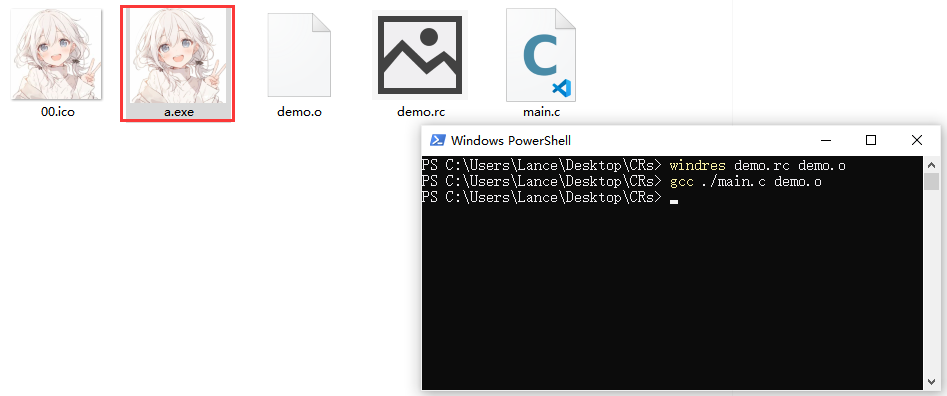




评论 (0)